Writing problems
Your characters aren't appearing in the proportions you expected
Some people occupy far more of the manuscript than you intended, while others who matter to the ending have barely appeared. There may be no single obvious disappearance.
How PlotDirector can help
Start here
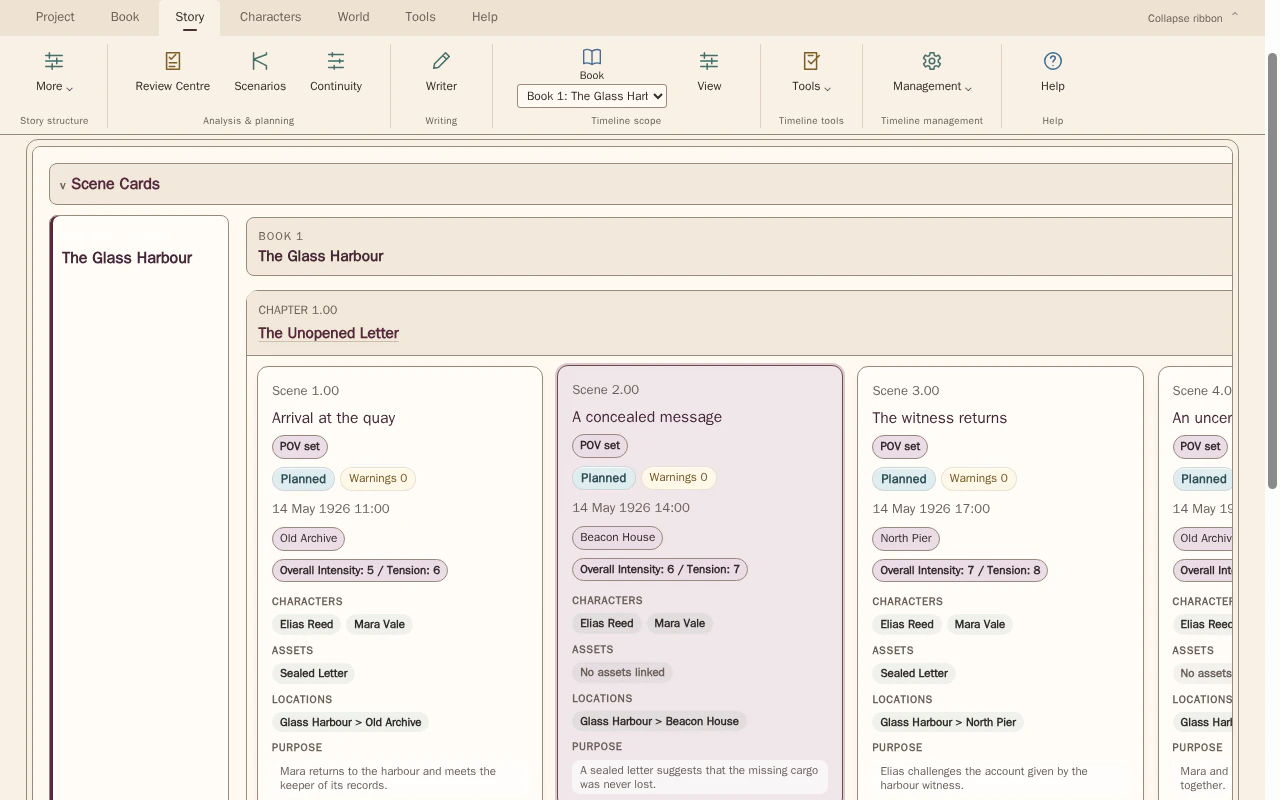
Timeline · character appearances
Character labels on scene cards help you compare actual recorded appearances with the role you want.
Read the character and POV labels attached to scene cards in manuscript order. Use scene details to check whose presence is recorded.
Look for Long runs of one character, quieter important roles and places where the intended emphasis changes.
See how Timeline · character appearances worksExplore the tool without signing in.
Why this happens
Drafting can favour the easiest viewpoint or most immediately engaging relationship. The resulting distribution may be effective, but it is worth comparing with the roles you want the cast to play.
Compare who is present with who actually influences a scene. Repeated background appearances do not necessarily prepare a character to carry the decisive emotional work at the ending.
What to look for
- Compare presence across the beginning, middle and ending
- Separate scene counts from consequential participation
- Check who carries decisive moments versus background appearances