Writing problems
There are too many storylines to keep in your head
You can remember each storyline in isolation, yet lose track of which ones are active when you return to the draft. Adding another scene seems to create several new obligations.
How PlotDirector can help
Start here
Plot Lines Workspace
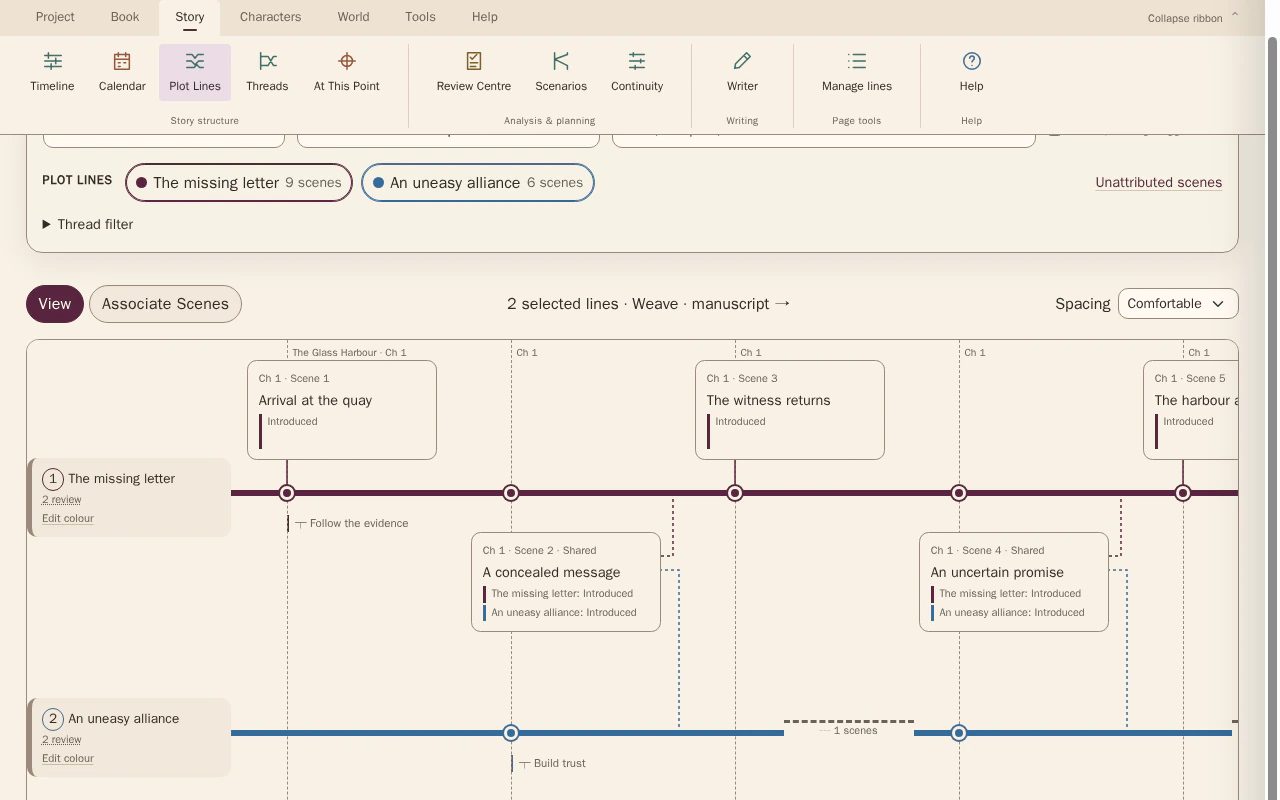
A map of selected lines gives each open thread a visible place in the manuscript.
Follow selected storylines through their recorded scene contributions. Focus isolates one line; Weave shows shared scenes and the gaps between contributions.
Look for Open lines with long breaks, overlapping work and threads you keep searching back to recover.
See how Plot Lines Workspace worksExplore the tool without signing in.
Why this happens
New threads often arrive faster than their relationships become visible. The difficulty may be the amount you are holding in memory, rather than the number of plots the novel can sustain.
For example, a thread may be easy to describe but hard to place beside its neighbours. Naming its next unresolved commitment can be more useful than writing a longer synopsis.
What to look for
- List each thread's unresolved question
- Mark where threads share a consequence
- Find lines with no clear next contribution